

Soundbar problems usually start at the handoff between the TV and the wall. The speaker can look centered and still fail if the audio path, power, remote control and cable slack were treated as afterthoughts.
Plan the audio before the TV sits tight to the wall
A clean TV mount can still feel unfinished when the soundbar cable has nowhere to go, ARC will not wake correctly, the optical cable is bent or the speaker blocks the remote sensor. Audio belongs in the mounting plan, not in the cleanup pile.
Audio pass: Check TV ports, soundbar position, HDMI ARC/eARC or optical route, power, remote behavior, cable slack and a real content test.
The best time to choose the audio path is before the screen is locked flat. Once the TV is on a low-profile bracket, a simple cable change can become a two-person job.
Planning boundary: This guide explains practical field-service planning for soundbar setup after a TV mount. Always follow the TV and soundbar manuals, and keep line-voltage power work separate from low-voltage signal cable routing.
Start with the connection, then place the speaker
HDMI ARC or eARC is usually the cleanest starting point when both devices support it. It can carry audio and control behavior through one cable, but it still depends on the correct TV port, device settings and cable quality.
Optical is a practical fallback. It is often predictable and easy to explain, especially when HDMI control gets messy. The tradeoff is control behavior: the TV remote may not handle volume the same way, so that test has to happen before closeout.
Audio-path checks before mounting is finished
- Confirm whether the TV has an HDMI ARC or eARC port, not just a normal HDMI input.
- Confirm whether the soundbar has HDMI ARC/eARC input or only optical/Bluetooth/analog options.
- Use the correct cable length with enough slack for the mount type.
- Decide whether source devices connect to the TV or pass through the soundbar.
- Plan how the customer will control volume after the install.
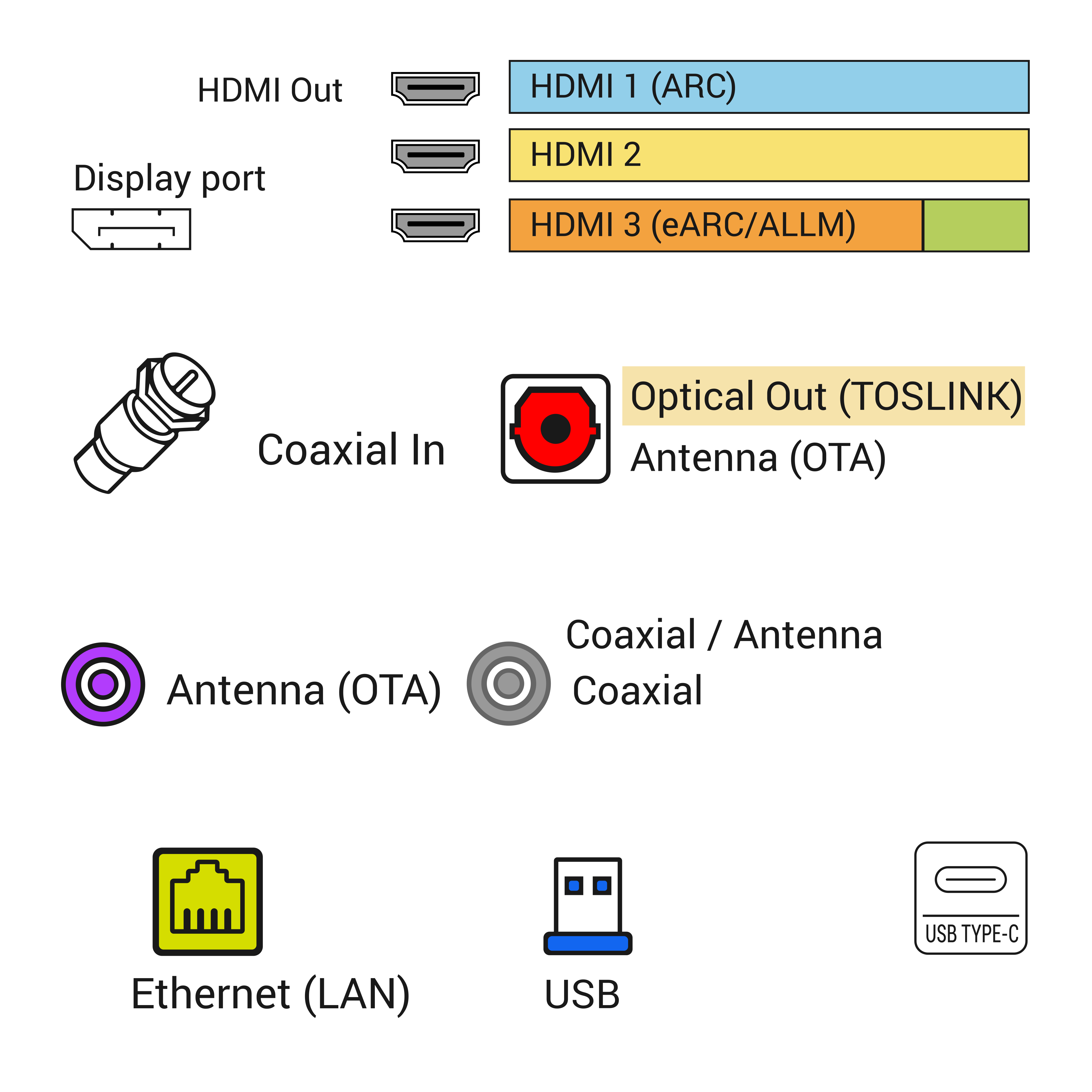


ARC and eARC need the right port and the right setting
A common field problem is simple: the HDMI cable is plugged into the wrong HDMI port. A TV can have several HDMI inputs, but usually only one is marked ARC or eARC. If the soundbar is connected to HDMI 1 while ARC is on HDMI 3, the install may look clean and still have no sound. The same kind of mistake happens on the soundbar side when the cable lands in a normal HDMI input instead of the ARC/eARC port.
The second problem is settings. Many TVs need HDMI-CEC, ARC or eARC enabled in the audio menu. Some need the speaker output changed from TV speakers to receiver, audio system or external speakers. Some soundbars need the input set to TV ARC. None of that is visible in a finished wall photo, so it has to be part of the closeout test.
CEC is helpful but not magic. It is the control layer that often lets the TV remote change soundbar volume and power behavior. It can also be inconsistent across brands and older devices. A technician should not promise that every remote will behave perfectly. The correct promise is better: connect the right path, enable the right settings, test the real remote, and document the limitation if a device does not support the expected control.
Optical audio is the fallback, not a failure
Optical audio gets treated unfairly. It is not the most advanced option, but it can save a setup when ARC negotiation fails, when the TV is older, or when the customer only needs reliable audio from the TV to the bar. The cable is directional in the practical sense that it needs a clean route and protected connector, even if the signal standard itself is not complicated for the user.
The limitation is control. With optical, the customer may need a soundbar remote, a programmed universal remote, an IR-learning setup or a soundbar that can learn TV remote commands. If the customer expects one-remote control, that expectation has to be tested. Otherwise the install ends with a clean wall and a daily annoyance.
Placement affects both sound and serviceability
A soundbar usually belongs close to the screen, centered with the TV, and not blocked by the mantel, cabinet lip or decorations. But the best visual location is not always the best service location. The bar needs power. It may need HDMI, optical, Ethernet, subwoofer pairing or a future firmware reset. If it is mounted too tightly under the TV or trapped behind trim, a simple cable change becomes a second service visit.
The TV mount type changes the answer. A fixed mount usually lets the soundbar stay on a console or attach under the TV. A full-motion mount raises a harder question: should the soundbar move with the TV, or stay fixed in the room? If the TV swings toward a seating area but the soundbar points straight ahead, the finished setup may look right and sound wrong. If the soundbar moves with the TV, cable slack and bracket compatibility matter more.
Placement checks that prevent callbacks
- Center the soundbar with the screen or explain why the room forces a different choice.
- Keep the soundbar grille and upward-firing speakers unobstructed.
- Confirm the bar does not block the lower screen edge or TV sensors.
- Leave service access for HDMI, optical, power and reset/pairing buttons.
- Check whether a full-motion TV mount changes the sound direction.
Cable concealment has to respect power and slack
Soundbar cables often get folded into the TV cable plan, but they should still be separated by purpose. HDMI and optical are low-voltage signal cables. Power is different. A normal removable power cord should not be buried loose in the wall to make the photo look cleaner. If power needs to be hidden, use an appropriate outlet location, an approved in-wall power solution where suitable, or electrician-managed work.
Slack matters because the system has to be used after the technician leaves. A fixed TV mount still needs enough service loop to remove the TV later. A tilt mount needs cable movement. A full-motion mount needs enough slack through the whole arm path. The same applies to a soundbar bracket under the TV. A cable that looks tidy with the TV flat can pull against the port when the screen moves.
Subwoofer, streaming box and game console can change the setup
A soundbar rarely lives alone. There may be a wireless subwoofer, a streaming box, a game console, a cable box, a Blu-ray player or a receiver-like pass-through arrangement. Each device changes the workflow. If the streaming device plugs into the TV, ARC/eARC carries audio back to the soundbar. If sources plug into the soundbar first, then the soundbar has to pass video to the TV. That can affect HDMI version, 4K/HDR support and cable quality.
Wireless subwoofers need placement too. They need power, pairing and a reasonable room position. A subwoofer hidden in a cabinet may rattle or disconnect. A bar that depends on Wi-Fi or app setup may need the customer account and phone available. These are small details, but they are exactly the details that separate a clean installation from a frustrating one.
Troubleshooting should follow a simple order
When there is no sound, replacing everything is the expensive guess. Confirm the TV output setting, soundbar input, cable location, cable condition and source path first. If the TV speakers work but the bar does not, check ARC/eARC and CEC settings. If optical works but ARC does not, the issue may be HDMI control, port selection, cable quality or device compatibility. If one app works and another does not, the issue may be audio format or app/source behavior.
Lip-sync issues need a different mindset. They may come from TV processing, soundbar processing, Bluetooth delay, app behavior or source-device settings. The closeout should test the customer’s real source, not only a random menu sound. If the customer mainly watches streaming apps, test a streaming app. If they use a cable box, test the cable box. If they use a game console, test the console.
Fast soundbar troubleshooting order
- Check the selected TV audio output and soundbar input.
- Verify the cable is in the ARC/eARC port when using HDMI audio return.
- Enable HDMI-CEC/ARC/eARC settings where the device manuals require them.
- Try optical as a fallback to separate audio-path problems from control-path problems.
- Test the actual customer source and remote before closeout.
What a good soundbar closeout should prove
A good closeout is not “the bar made noise once.” It proves the TV turns on, the right source plays, the soundbar receives audio, volume control works in the expected way, power behavior is understood, and the customer knows which remote or app controls what. If there is a limitation, such as optical requiring a second remote, that should be explained before the job is called finished.
The technician should also leave the setup serviceable. The customer should know where the cable path goes, which port was used, whether a future game console or streaming box needs a different HDMI plan, and whether moving the TV will pull on the soundbar cable. A mounted TV with hidden cables is only clean when the audio system can still be maintained.
What to send before booking soundbar setup
Send the TV model, soundbar model, mount type, wall photo, media console photo and a photo of the TV ports if available. If the TV is already mounted, send a side photo that shows how much hand clearance exists behind the screen. Mention whether the soundbar will sit on furniture, mount to the wall or attach to the TV bracket. Also mention the devices you actually use: streaming box, cable box, game console, antenna, Blu-ray player or built-in TV apps.
Those details let the technician bring the right cables, adapters, wall plates or bracket hardware. They also make it easier to avoid the common second-trip problem: the TV is mounted beautifully, but the soundbar needs a cable or port that nobody planned for.
Before booking: Before booking, send a wide wall photo, a closer outlet or console photo, TV size, mount status and whether cable concealment is part of the job.
Soundbar setup checklist
| Symptom | Isolation step | Likely layer | Escalate when |
|---|---|---|---|
| No sound over HDMI | Confirm ARC or eARC port, CEC setting and audio output mode | Photo of HDMI labels on TV and soundbar | ARC fails after cable and setting changes on known-good ports |
| Audio delay or lip sync | Test TV speakers, soundbar mode and streaming input separately | Short note naming the source app or device | Delay changes by app or cannot be corrected in TV or soundbar settings |
| Optical fallback needed | Verify optical output, PCM setting and remote volume behavior | Photo of optical path and soundbar display | Customer expects Atmos or TV remote control that optical cannot provide |
| Poor placement | Check sensor blockage, upward drivers, wall clearance and cable strain | Final photo from seating position | The mount or shelf position forces blocked ports or unsafe cable bends |
Work through the signal path first, then placement. Audio problems are often connection problems wearing a different label.
Trusted signal references
Use the official HDMI references when the issue is ARC, eARC, cable type or port capability rather than speaker placement.
Follow the handoff path
Share this article:
Facebook X LinkedIn Email Text Add comment
Need help with a similar setup?
Send photos of the wall, network equipment, device labels you can share safely, and the result you want. The service team can usually narrow the right next step before an onsite visit.
Plan a cleaner service visit
Send a wide photo, one close device photo, the cable path and the result you want. Leave out account screens, addresses and private labels unless they are safely covered.
Request a callFeatured service

Field Service Blog Guide: TV, Wi-Fi, POS, Security and Onsite Support
Use this guide as a dispatch map for the real problem in front of you: screen, cable, Wi-Fi, POS lane, rack, camera, phone or onsite support visit.
View servicesRelated articles
Comments
Reader notes and service questions
No approved comments yet.
Leave a comment